Upgrade a Disconnected Cluster
The easiest way to update a disconnected cluster is via the cli.
From your disconnected registry/mirror, find the release image to upgrade to.
Browse to registry, https://mirror.lab.local:8443
Filter Repositories for “release-image” and click Name.
On the left hand side select the “Tags” icon.
Search for the image tag to upgrade to and click the “Fetch Tag” icon.

In the “Image Format” drop down list select “Podman Pull (by digest)” and click the “Copy Command”
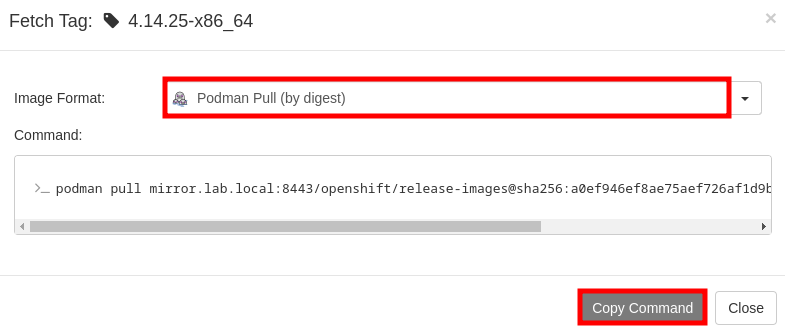
From the CLI start the upgrade. Use the
--to-image=switch and the image identified in the previous steps.Note
Be sure to only use the url and release. You can remove “podman pull” from the copied content.
oc adm upgrade --to-image=mirror.lab.local:8443/openshift/release-images@sha256:a0ef946ef8ae75aef726af1d9bbaad278559ad8cab2c1ed1088928a0087990b6
Find and Apply the Release Signature
In some instances it may be necessary to manual create the release signature
config map. These files are typically created when mirroring to the
disconnected registry and can be found in the
<working_dir/cluster_resource> directory.
Create the following environment variables:
OCP Release Version
OCP_RELEASE_VERSION=4.18.19
ARCHITECTURE
OCP_ARCHITECTURE=x86_64
DIGEST
DIGEST=$(oc adm release info quay.io/openshift-release-dev/ocp-release:${OCP_RELEASE_VERSION}-${OCP_ARCHITECTURE} | sed -n 's/Pull From: .*@//p')
DIGEST Algorithm
DIGEST_ALGO=${DIGEST%%:*}
DIGEST Signature
DIGEST_ENCODED=${DIGEST#*:}
Image Signature
SIGNATURE_BASE64=$(curl -s "https://mirror.openshift.com/pub/openshift-v4/signatures/openshift/release/${DIGEST_ALGO}=${DIGEST_ENCODED}/signature-1" | base64 -w0 && echo)
Create the config map
cat << EOF | oc create -f -
apiVersion: v1
kind: ConfigMap
metadata:
  name: release-image-${OCP_RELEASE_VERSION}
  namespace: openshift-config-managed
  labels:
    release.openshift.io/verification-signatures: ""
binaryData:
  ${DIGEST_ALGO}-${DIGEST_ENCODED}: ${SIGNATURE_BASE64}
EOF
Configure Openshift Update Service
This process is one way to upgrade a disconnected cluster using your local disconnected registry and the “cincinnati” operator.
The Update Service Operator needs the config map to include the key name “updateservice-registry” in the registry CA cert. Edit the ConfigMap “registry-config” and add the new section using the same local mirror cert.
Attention
This ConfigMap was created in the “Local Mirror & Registry section (Update Running Cluster).
oc create configmap registry-config --from-file=$quayHostname..8443=$quayRoot/quay-rootCA/rootCA.pem -n openshift-config

oc patch --type merge images.config.openshift.io/cluster --patch '{"spec":{"additionalTrustedCA":{"name":"registry-config"}}}'
oc edit cm registry-config -n openshift-config
Add the following highlighted section.
apiVersion: v1
data:
  mirror.lab.local..8443: |
    -----BEGIN CERTIFICATE-----
    <Use rootCA.pem from your mirror registry here>
    -----END CERTIFICATE-----
  updateservice-registry: |
    -----BEGIN CERTIFICATE-----
    <Use rootCA.pem from your mirror registry here>
    -----END CERTIFICATE-----
kind: ConfigMap
metadata:
  name: registry-config
  namespace: openshift-config
Add router-ca to “Proxy” object as a trustedCA.
oc get -n openshift-ingress-operator secret router-ca -o jsonpath="{.data.tls\.crt}" | base64 -d > ca-bundle.crt
oc create cm router-bundle --from-file=ca-bundle.crt -n openshift-config
oc edit proxy cluster
Update the highlighted line.
apiVersion: config.openshift.io/v1
kind: Proxy
metadata:
  creationTimestamp: "2021-12-21T05:36:05Z"
  generation: 1
  name: cluster
  resourceVersion: "665"
  uid: d2d476ba-c98c-46dd-8130-b85d40d009fb
spec:
  trustedCA:
    name: "router-bundle"
status: {}
Important
This change will cause the nodes to cycle through a reboot. Before moving to next step wait for the change to apply to all nodes. Monitor via “oc get nodes” and/or “oc get mcp”
Install the Openshift Update Service Operator from the Web Console. Go to and search for “update”.

Select “Openshift Update Service” operator and click install.
By default, the “openshift-update-service” namespace will be used. Accept the defaults and click “Install”.
After install completes click “View Operator”.
Select the “Update Service” tab.
Click “Create UpdateService”.
Select “YAML view”
Replace the sample yaml with the results from your mirror. The “updateService.yaml” can be found at “./oc-mirror-workspace/results-xxxxxxxxxx” and should look like the following example:
Attention
Every time the registry is updated, this graph-image sha256 hash will change. This object will have to be updated.
apiVersion: updateservice.operator.openshift.io/v1
kind: UpdateService
metadata:
  name: update-service-oc-mirror
spec:
  graphDataImage: mirror.lab.local:8443/openshift/graph-image@sha256:2af43ff6160363bec6ab2567738b1a9ed9f3a8129f8b9fd1f09e6f6b675f2e69
  releases: mirror.lab.local:8443/openshift/release-images
  replicas: 2
Patch the Cluster Version Operator
NAMESPACE=openshift-update-service
NAME=update-service-oc-mirror
POLICY_ENGINE_GRAPH_URI="$(oc -n "${NAMESPACE}" get -o jsonpath='{.status.policyEngineURI}/api/upgrades_info/v1/graph{"\n"}' updateservice "${NAME}")"
PATCH="{\"spec\":{\"upstream\":\"${POLICY_ENGINE_GRAPH_URI}\"}}"

oc patch --type merge clusterversion version --patch $PATCH
Check . Details should display Current version and Update status
