Local Mirror & Registry
The following Guide will walk through the process of creating a local mirror and registry for deploying OpenShift on a disconnected network.
Prerequisites
Download the following files and copy to the destination server.
Attention
These links point to the latest version. Typically you’ll want a specific version. You can find those here by browsing to the version specific directory:
https://mirror.openshift.com/pub/openshift-v4/amd64/clients/ocp/
SSH to the target server and run the following commands to place the binaries in their respective directories.
mkdir ~/mirror-registry
tar -xzvf mirror-registry-2.0.1.tar.gz -C ~/mirror-registry/
tar -xzvf oc-4.16.8-linux.tar.gz -C ~/.local/bin
tar -xzvf oc-mirror.rhel9.tar.gz -C ~/.local/bin
chmod +x ~/.local/bin/oc-mirror
rm ~/.local/bin/README.md
cd ~/mirror-registry
Create the target directory for the new registry. In my lab I’m using “/mirror”.
sudo mkdir /mirror

sudo chown -R vince: /mirror
Identify and create the Hostname and Directory session variables. In my case I’m using the following for my lab:
Important
For “quayHostname” be sure to use a name that can be resolved via DNS or the local hosts file. The installer will use that name to validate the service.
Important
With v2 “pgStorage” is replaced with “sqliteStorage”.
Note
The “ocp4” directory in “/mirror” will be created by the installer.
cat << EOF > ./variables

export quayHostname="mirror.lab.local"
export quayRoot="/mirror/ocp4"
export quayStorage="/mirror/ocp4"
export sqliteStorage="/mirror/ocp4"
export initPassword="password"
EOF

source ./variables
Create Local Registry
Run the following command to install the registry pods as root.
Warning
Installing as “sudo” will force IPv4 only listener. If IPv6 is required install as a normal user and see next step. I recommend not installing as root.
Tip
The registry uses port 8443 by default. This can be changed by adding :port to $quayHostname when installing. Be sure to add that port in every subsequent step.
./mirror-registry install --quayHostname $quayHostname --quayRoot $quayRoot \
  --quayStorage $quayStorage --sqliteStorage $sqliteStorage --initPassword $initPassword
If ran correctly should see a similar ansible recap.

If IPv6 is required. Add switch
FEATURE_LISTEN_IP_VERSION: IPv6to the config file, “/mirror/ocp4/quay-config/config.yaml” and restart quay-app.Tip
You can also enable dual stack with
FEATURE_LISTEN_IP_VERSION: dual-stacksystemctl --user restart quay-app.service
Check the results with the following curl commands:
curl -4 -k https://mirror.lab.local:8443/health/instance

curl -6 -k https://mirror.lab.local:8443/health/instance
Copy newly created root CA, update trust, and open firewall port.
sudo cp $quayRoot/quay-rootCA/rootCA.pem /etc/pki/ca-trust/source/anchors/quayCA.pem
sudo update-ca-trust extract
sudo firewall-cmd --add-port=8443/tcp --permanent
sudo firewall-cmd --reload
sudo firewall-cmd --list-all
Test mirror availability via cli. The following command should return “Login Succeeded!” if everything is working.
Hint
Use the
--tls-verify=falseif not adding the rootCA to the trust.podman login -u init -p $initPassword $quayHostname:8443
Access mirror via browser at https://$quayHostname:8443
Hint
Username = “init” / Password = “password”
Tip
Upgrade running registry
./mirror-registry upgrade --quayHostname $quayHostname --quayRoot $quayRoot \
  --quayStorage $quayStorage --sqliteStorage $sqliteStorage
Tip
If something went wrong, the following command will UNINSTALL the registry.
./mirror-registry uninstall --quayRoot $quayRoot --quayStorage $quayStorage \
  --sqliteStorage $sqliteStorage
Mirror Images to Local Registry (v2)
Important
This section is now based on oc-mirror v2 released with v4.18.
Before mirroring images we need a copy of your Red Hat “Pull Secret” and update it with the local mirror information. If you haven’t done so download it here: your pull secret
Convert and copy pull-secret.txt to ~/.docker/config.json
Attention
You may need to install “jq” for this step.
cd ~
mkdir ~/.docker
cat ./pull-secret.txt | jq . > ~/.docker/config.json
Generate the base64-encoded user name and password for mirror registry.
Note
My registry username and password are “init” and “password”.
echo -n 'init:password' | base64 -w0
Modify ~/.docker/config.json by adding local mirror information. Use the previous steps encoded output for “auth”.
Attention
Be sure to replace “$quayHostname:8443” environment variable with the real name. For example “mirror.lab.local:8443”.
{
  "auths": {
    "$quayHostname:8443": {
      "auth": "aW5pdDpwYXNzd29yZA=="
    },
    "cloud.openshift.com": {
      "auth": "b3BlbnNo...",
      "email": "you@example.com"
    },
    "quay.io": {
      "auth": "b3BlbnNo...",
      "email": "you@example.com"
    },
    "registry.connect.redhat.com": {
      "auth": "fHVoYy1w...",
      "email": "you@example.com"
    },
    "registry.redhat.io": {
      "auth": "fHVoYy1w...",
      "email": "you@example.com"
    },
    "registry6.redhat.io": {
      "auth": "fHVoYy1w...",
      "email": "you@example.com"
    }
  }
}
Create the following ImageSetConfiguration files.
Important
In my lab I broke down the process by platform, operators, and additionalImages. You could combine them but I found it easier to manage the process with speration.
Hint
“graph: true” mirror’s the graph data to the disconnected registry. This information enables the disconnected cluster, via the update service operator, to show a visual representation of the available upgrades.
Hint
“shortestPath: true” instructs the oc mirror command to only pull the required version to upgrade from one version to the next. It will prune any unneeded version.
isc-4.18.yamlcat << EOF > /mirror/oc-mirror/isc-4.18.yaml kind: ImageSetConfiguration apiVersion: mirror.openshift.io/v2alpha1 mirror: platform: architectures: - "amd64" channels: - name: stable-4.18 type: ocp minVersion: 4.18.19 maxVersion: 4.18.19 shortestPath: true graph: false additionalImages: - name: registry.redhat.io/openshift4/ose-cluster-node-tuning-rhel9-operator:v4.18 - name: registry.redhat.io/openshift4/ztp-site-generate-rhel8:v4.18 - name: registry.redhat.io/openshift4/dpdk-base-rhel9:v4.18 EOF
isc-4.18-operators.yamlcat << EOF > /mirror/oc-mirror/isc-4.18-operators.yaml kind: ImageSetConfiguration apiVersion: mirror.openshift.io/v2alpha1 mirror: operators: - catalog: registry.redhat.io/redhat/redhat-operator-index:v4.18 packages: - name: advanced-cluster-management - name: cincinnati-operator - name: kubernetes-nmstate-operator - name: kubevirt-hyperconverged - name: local-storage-operator - name: lvms-operator - name: metallb-operator - name: multicluster-engine - name: nfd - name: odf-operator - name: cephcsi-operator - name: mcg-operator - name: ocs-client-operator - name: ocs-operator - name: odf-csi-addons-operator - name: odf-dependencies - name: odf-multicluster-orchestrator - name: odf-prometheus-operator - name: recipe - name: rook-ceph-operator - name: openshift-gitops-operator - name: ptp-operator - name: quay-operator - name: skupper-operator - name: sriov-network-operator - name: topology-aware-lifecycle-manager - catalog: registry.redhat.io/redhat/certified-operator-index:v4.18 packages: - name: gpu-operator-certified EOF
isc-additional-images.yamlcat << EOF > /mirror/oc-mirror/isc-additional-images.yaml kind: ImageSetConfiguration apiVersion: mirror.openshift.io/v2alpha1 mirror: additionalImages: - name: registry.redhat.io/ubi10/ubi:latest - name: registry.redhat.io/ubi10/httpd-24:latest - name: registry.redhat.io/rhel10/httpd-24:latest - name: registry.redhat.io/ubi10/nginx-126:latest - name: registry.redhat.io/rhel10/nginx-126:latest - name: registry.redhat.io/rhel9/support-tools:latest - name: registry.redhat.io/rhel10/support-tools:latest - name: ghcr.io/k8snetworkplumbingwg/sriov-network-device-plugin:latest - name: quay.io/openshift-scale/etcd-perf:latest - name: docker.io/centos/tools:latest - name: docker.io/f5devcentral/f5-hello-world:latest - name: registry.redhat.io/rhel10/rhel-guest-image:latest - name: registry.redhat.io/rhel9/rhel-guest-image:latest - name: registry.redhat.io/rhel8/rhel-guest-image:latest - name: quay.io/containerdisks/fedora:latest - name: quay.io/containerdisks/centos-stream:9 - name: quay.io/containerdisks/centos-stream:10 - name: quay.io/curl/curl:latest EOF
Tip
To discover operators by their package name, applicable channels, and versions use the following commands.
# List ALL available operators
oc mirror list operators --catalog registry.redhat.io/redhat/redhat-operator-index:v4.16

# List package specific inormation for an operator
oc mirror list operators --package sriov-network-operator --catalog registry.redhat.io/redhat/redhat-operator-index:v4.16
Mirror images to registry.
With oc-mirror v2 we have the option to mirror to disk first then mirror to registry. It is possible to mirror directly to the registry as was the default with v1 but I prefer the two step method. For disconnected environments this is the best and only option.
Note
Be patient! Each step of the process will take a lot of time.
Note
The directive
--cache-dirwill ensure all the images are written to a directory with the necessary space. Without this it will default $HOME.Tip
The process of mirroring to disk will overwrite the cluster resources directory with each attempt. To include the previous results use the
--sinceswitch.Important
If you see missing images/errors at the end of each step, re-run the oc-mirror command.
Mirror-to-Disk.
oc mirror --v2 -c ./imageset-config.yaml --since 2025-03-12 --cache-dir <directory_name> file://<directory_name>

Tip
I created the following script to simplify the command:
#!/bin/bash

OCPV=$1

if [[ -z "$OCPV" ]]; then
  echo -e "\nPlease specify ImageSetConfiguration!"
else
  echo -e "\nMirroring $OCPV based on ./isc-$OCPV.yaml\n"

  oc mirror --v2 -c ./isc-$OCPV.yaml --cache-dir /mirror/oc-mirror/$OCPV \
    --since 2025-03-12 file:///mirror/oc-mirror/$OCPV
fi
Disk-to-Mirror.
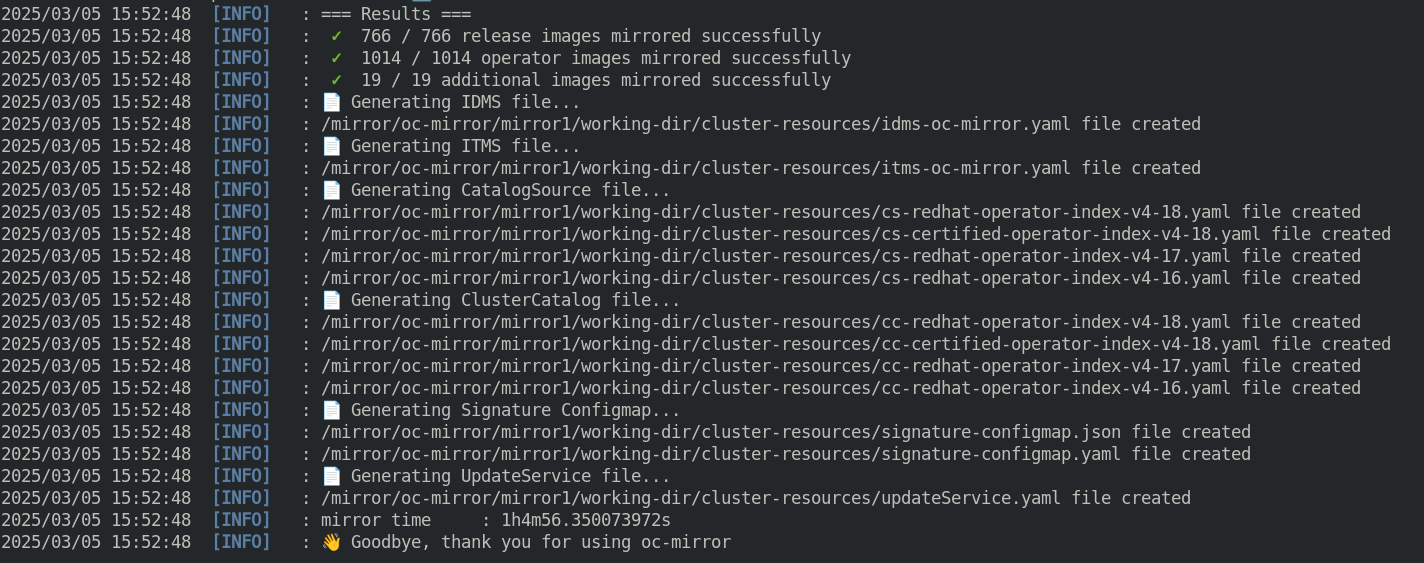
oc mirror --v2 -c ./imageset-config.yaml --cache-dir <directory_name> --from file://<directory_name> docker://$quayHostname:8443
Tip
I created the following script to simplify the command:
#!/bin/bash

OCPV=$1

if [[ -z "$OCPV" ]]; then
  echo -e "\nPlease specify ImageSetConfiguration!"
else
  echo -e "\nMirroring $OCPV based on ./isc-$OCPV.yaml\n"

  oc mirror --v2 -c ./isc-$OCPV.yaml --cache-dir /mirror/oc-mirror/$OCPV \
    --from file:///mirror/oc-mirror/$OCPV docker://$quayHostname:8443
fi
Make note of the information upon completion. Supporting yaml files can be found in “<directory_name>/working-dir/cluster-resources”. These files will be applied to your running cluster.
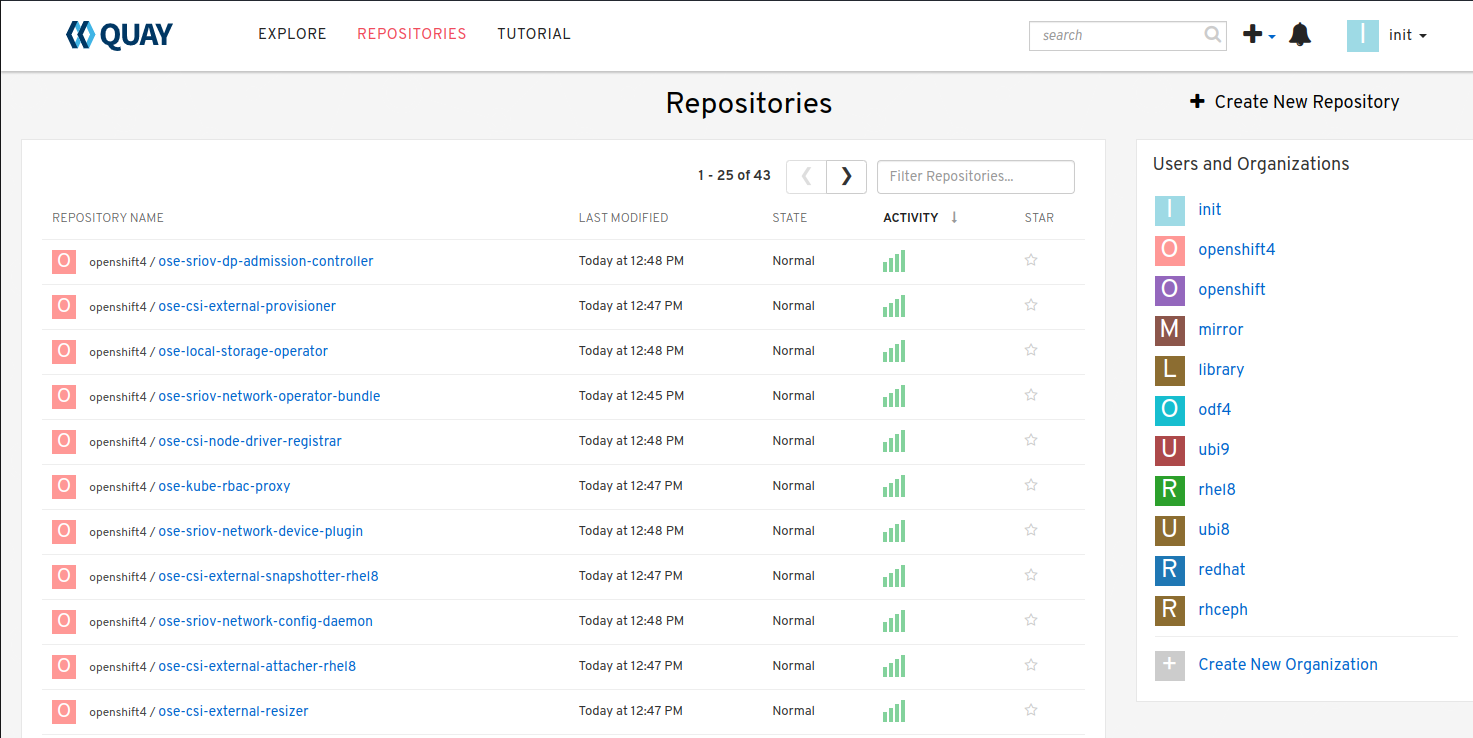
Connect and login to your mirror: https://$quayHostname:8443 You should see something similar to the following:
Delete Images from Local Registry (v2)
With v2 the process no longer auto purges the older files. You have to use the following two step process.
Create the DeleteImageSetConfiguration yaml files. In my lab I broke down the process by platform, operators, and additionalImages.
delete-isc-4.18.yamlcat << EOF > /mirror/oc-mirror/delete-isc-4.18.yaml kind: DeleteImageSetConfiguration apiVersion: mirror.openshift.io/v2alpha1 delete: platform: architectures: - "amd64" channels: - name: stable-4.18 minVersion: 4.18.19 maxVersion: 4.18.19 additionalImages: - name: registry.redhat.io/openshift4/ose-cluster-node-tuning-rhel9-operator:v4.18 - name: registry.redhat.io/openshift4/ztp-site-generate-rhel8:v4.18 - name: registry.redhat.io/openshift4/dpdk-base-rhel9:v4.18 EOF
delete-isc-4.18-operators.yamlcat << EOF > /mirror/oc-mirror/delete-isc-4.18-operators.yaml kind: DeleteImageSetConfiguration apiVersion: mirror.openshift.io/v2alpha1 delete: operators: - catalog: registry.redhat.io/redhat/redhat-operator-index:v4.18 packages: - name: advanced-cluster-management - name: cincinnati-operator - name: kubernetes-nmstate-operator - name: kubevirt-hyperconverged - name: local-storage-operator - name: lvms-operator - name: metallb-operator - name: multicluster-engine - name: nfd - name: odf-operator - name: cephcsi-operator - name: mcg-operator - name: ocs-client-operator - name: ocs-operator - name: odf-csi-addons-operator - name: odf-dependencies - name: odf-multicluster-orchestrator - name: odf-prometheus-operator - name: recipe - name: rook-ceph-operator - name: openshift-gitops-operator - name: ptp-operator - name: quay-operator - name: skupper-operator - name: sriov-network-operator - name: topology-aware-lifecycle-manager - catalog: registry.redhat.io/redhat/certified-operator-index:v4.18 packages: - name: gpu-operator-certified EOF
delete-isc-additional-images.yamlcat << EOF > /mirror/oc-mirror/delete-isc-additional-images.yaml kind: DeleteImageSetConfiguration apiVersion: mirror.openshift.io/v2alpha1 delete: additionalImages: - name: registry.redhat.io/ubi10/ubi:latest - name: registry.redhat.io/ubi10/httpd-24:latest - name: registry.redhat.io/ubi10/nginx-126:latest - name: registry.redhat.io/rhel10/support-tools:latest - name: ghcr.io/k8snetworkplumbingwg/sriov-network-device-plugin:latest - name: quay.io/openshift-scale/etcd-perf:latest - name: docker.io/centos/tools:latest - name: docker.io/f5devcentral/f5-hello-world:latest - name: registry.redhat.io/rhel10/rhel-guest-image:latest - name: registry.redhat.io/rhel9/rhel-guest-image:latest - name: registry.redhat.io/rhel8/rhel-guest-image:latest - name: quay.io/containerdisks/fedora:latest - name: quay.io/containerdisks/centos-stream:9 - name: quay.io/containerdisks/centos-stream:10 - name: quay.io/curl/curl:latest EOF
Delete phase 1 (generate)
oc mirror delete --v2 -c ./delete-isc.yaml --generate --workspace file://<directory_name> docker://$quayHostname:8443
Delete phase 2 (delete)
Note
The directive
--force-cache-deletewill remove the images from the local cache directory.oc mirror delete --v2 --delete-yaml-file <directory_name>/working-dir/delete/delete-images.yaml docker://$quayHostname:8443
Tip
I created the following script to simplify the command:
#!/bin/bash

OCPV=$1

if [[ -z "$OCPV" ]]; then
  echo -e "\nPlease specify ImageSetConfiguration!"
else
  echo -e "\nDeleting $OCPV images based on ./delete-isc-$OCPV.yaml"
  echo -e "\nGenerating..."

  oc mirror delete --v2 -c ./delete-isc-$OCPV.yaml --cache-dir /mirror/oc-mirror/$OCPV \
    --generate --workspace file:///mirror/oc-mirror/$OCPV docker://$quayHostname:8443

  echo -e "\nDeleting..."

  oc mirror delete --v2 --cache-dir /mirror/oc-mirror/$OCPV --force-cache-delete \
    --delete-yaml-file ./$OCPV/working-dir/delete/delete-images.yaml docker://$quayHostname:8443
fi
Update Running Cluster
A running cluster needs to be updated to use the new registry/mirror. To create a new cluster using the local mirror & registry see: Agent-Based Install Notes
Attention
The first 3 steps are only needed when moving a cluster from connected to disconnected. If you built the cluster “disconnected” with this registry skip to step 4.
Extract OCP pull-secret. A new local file
.dockerconfigjsonis created.oc extract secret/pull-secret -n openshift-config --confirm --to=. cat ./.dockerconfigjson | jq . > ./.dockerconfig.json
Update
.dockerconfig.jsonwith local registry credentials.{ "auths": { "mirror.lab.local:8443": { "auth": "aW5pdDpwYXNzd29yZA==" } } }
Import the new pull-secret.
oc set data secret/pull-secret -n openshift-config --from-file=.dockerconfigjson=.dockerconfig.json
Create configmap of quay-rootCA.
oc create configmap registry-config --from-file=$quayHostname..8443=$quayRoot/quay-rootCA/rootCA.pem -n openshift-config
Add quay-rootCA to cluster.
oc patch --type merge images.config.openshift.io/cluster --patch '{"spec":{"additionalTrustedCA":{"name":"registry-config"}}}'
Tip
You can confirm the node has the cert by checking the following file.
ssh core@host11 ls -l /etc/docker/certs.d/
ssh core@host11 cat /etc/docker/certs.d/mirror.lab.local\:8443/ca.crt
Apply the YAML files from the results directory to the cluster.
Note
Everytime you successfully run “oc mirror” a “cluster-resources” dir is created. This contains all the yaml objects necessary to connect to the disconnected registry.
Important
If you don’t use the
--sinceswitch when mirroring, the results are not cumulative. I highly recommend using this switch.If you don’t include this switch the previously succsessful result will NOT be included. It will be necessary to manaully combine the results by backing up the original result and diffing the old and new files. Without doing this the running cluster will be missing references which are required to install and maintain operators and images.
oc apply -f <directory_name>/working-dir/cluster-resources/
Tip
You can confirm the node has the changes by checking the following file.
ssh core@host11 cat /etc/containers/registries.conf
For disconnected upgrades via the “Openshift Update Service” (next section) the “release-signatures” will need to be applied to the cluster.
Important
Disconnected upgrades will NOT work without this step.
oc apply -f <directory_name>/working-dir/cluster-resources/signature-configmap.yaml
The ability to install operators from the local mirror requires the default operator hub to be disabled.
oc patch OperatorHub cluster --type json -p '[{"op": "add", "path": "/spec/disableAllDefaultSources", "value": true}]'
Attention
Any change to the operator list requires the “CatalogSource” to be updated. To do so run “oc remove” and “oc create” of the “CatalogSource”.