Openshift Virtualization
Install Operator
Basic OpenShift Virtualization install to get started.
Important
Be sure to have enough cpu, memory, and storage. My lab is KVM based. For OCP Virt I start with a three node cluster, each node has 16 cores, 32G memory, and small 900G ODF/Ceph deployment.
Tip
To check nodes for CPU virtualization extensions, run the following command.
"kvm": null hardware not capable.
"kvm": "1k" hardware capable.
oc get nodes -o json|jq '.items[]|{"name": .metadata.name, "kvm": .status.allocatable["devices.kubevirt.io/kvm"]}'
From the OCP Console select . In the search box type “virtualization”.

Click Install. Leave defaults and Click Install again.

Watch install progress.
watch oc get po -n openshift-cnv
After install completes, open the newly installed operator. Select “Openshift Virtualization Deployment” tab and click “Create HyperConverged”.
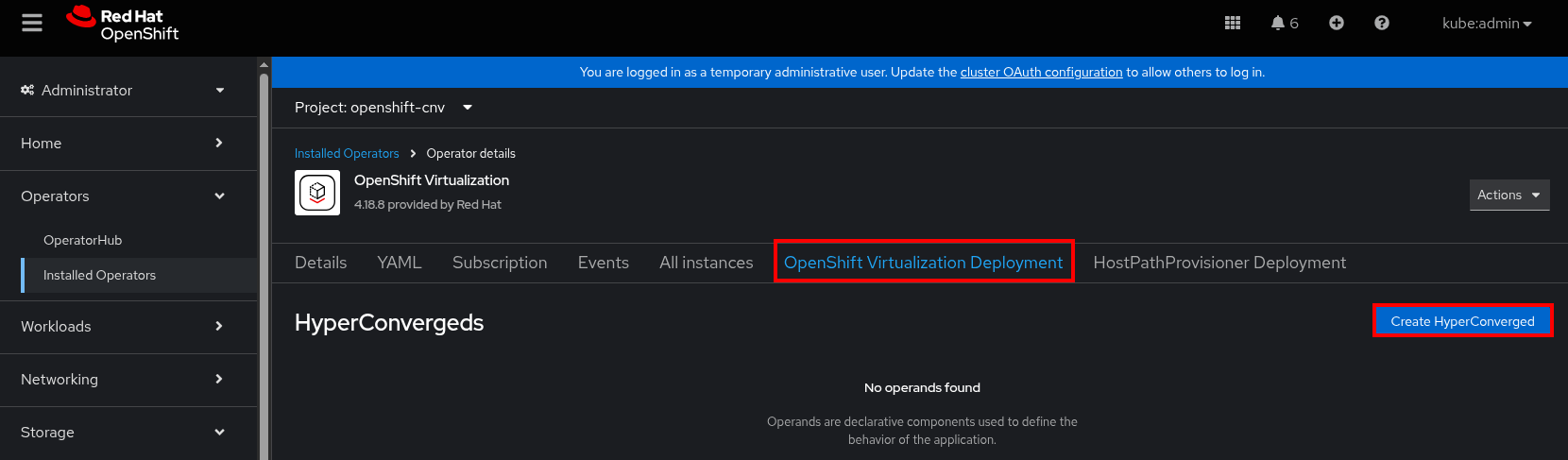
Accept the defaults and click “Create”.
Be patient several containers are pulled and started. You can monitor the progress by watching the pods in the “openshift-cnv” namespace.
watch oc get pods -n openshift-cnv
From the OCP Console refresh the page to enable the console plugin.
Go to . “Start Tour” if new to OpenShift Virtualization.
Default Catalog (Connected)
When the cluster is connected several images are pulled and the catalog is automagically created.
Once the process finishes a new VolumeSnapshot is created for each bootable volume. Goto

Review the bootable volumes. Goto . The following six images are downloaded and added to the catalog.

Review the catalog. Goto

Build Catalog (Disconnected)
With the disconnected environment the default container/images need to be downloaded and mirrored to your disconnected registry.
The following image set config can be used to mirror the required images. These are the same six images auto downloaded when cluster is connected. Create the following yaml file.
kind: ImageSetConfiguration
apiVersion: mirror.openshift.io/v2alpha1
mirror:
  additionalImages:
  - name: registry.redhat.io/rhel10/rhel-guest-image:latest
  - name: registry.redhat.io/rhel9/rhel-guest-image:latest
  - name: registry.redhat.io/rhel8/rhel-guest-image:latest
  - name: quay.io/containerdisks/fedora:latest
  - name: quay.io/containerdisks/centos-stream:9
  - name: quay.io/containerdisks/centos-stream:10
Mirror the images to your disconnected register.
See also
For more info on mirroring and building a registry see: Local Mirror & Registry
Mirror-to-Disk.
oc mirror --v2 -c ./isc-additionalimages.yaml --since 2025-04-20 file://<directory_name>
Disk-to-Mirror
oc mirror --v2 -c ./isc-additionalimages.yaml --from file://<directory_name> docker://$quayHostname:8443
Create the ImageTagMirrorSet.
apiVersion: config.openshift.io/v1
kind: ImageTagMirrorSet
metadata:
  name: itms-vm-catalog
spec:
  imageTagMirrors:
  - mirrors:
    - mirror.lab.local:8443/rhel8
    source: registry.redhat.io/rhel8
  - mirrors:
    - mirror.lab.local:8443/rhel9
    source: registry.redhat.io/rhel9
  - mirrors:
    - mirror.lab.local:8443/rhel10
    source: registry.redhat.io/rhel10
  - mirrors:
    - mirror.lab.local:8443/containerdisks
    source: quay.io/containerdisks
Create the ImageDigestMirrorSet.
apiVersion: config.openshift.io/v1
kind: ImageDigestMirrorSet
metadata:
  name: idms-vm-catalog
spec:
  imageDigestMirrors:
  - mirrors:
    - mirror.lab.local:8443/rhel8
    source: registry.redhat.io/rhel8
  - mirrors:
    - mirror.lab.local:8443/rhel9
    source: registry.redhat.io/rhel9
  - mirrors:
    - mirror.lab.local:8443/rhel10
    source: registry.redhat.io/rhel10
  - mirrors:
    - mirror.lab.local:8443/containerdisks
    source: quay.io/containerdisks
Create the itms and idms objects. Without these the disconnected cluster will not find the images.
oc create -f itms-vm-catalog.yaml
oc create -f idms-vm-catalog.yaml
Create the secret for your mirror. This needs to be added to the namespace where you plan on importing the image. I’m using the virt default, “openshift-virtualization-os-images”.
Note
The accessKeyID and secretKey are base64 encoded.
Important
This secret needs to be in the openshift-cnv and any other namespace you plan on importing images to.
apiVersion: v1
kind: Secret
metadata:
  name: mirror-secret
  labels:
    app: containerized-data-importer
type: Opaque
data:
  accessKeyId: "aW5pdA=="
  secretKey: "cGFzc3dvcmQ="
oc create -f mirror-secret.yaml -n openshift-virtualization-os-images
oc create -f mirror-secret.yaml -n openshift-cnv
The TLS cert needs to be added as well. You can accomplish this in two ways. First, create configmap with the cert. Be sure to do this in the namespace where you plan on importing images. Second, patch your hyperconverged environment to ignore insecure certs. I’ll show both options:
See also
A better explanation of this and the previous step can be found here: Creating a registry image with a VM disk
Create ConfigMap:
Important
This certificate needs to be in the openshift-cnv and any other namespace you plan on importing images to.
Important
The cert name within the configmap must end in “.crt”.
oc create configmap mirror-rootca --from-file=rootCA.crt=./rootCA.pem -n openshift-virtualization-os-images
oc create configmap mirror-rootca --from-file=rootCA.crt=./rootCA.pem -n openshift-cnv
Patch HyperConverged:
oc patch hco kubevirt-hyperconverged -n openshift-cnv --type merge \
  --patch '{"spec": {"storageImport": {"insecureRegistries": ["mirror.lab.local:8443"]}}}'
Update the dataImportCronTemplates to use the disconnected registry. Patch the following yaml of the “spec:” section of your hyperconverged system. Each image requires this metadata. In my example below I’m merging all three missing references.
Note
This step should not be needed in a future release. I’ll update the section as soon as the change is merged and found on a z-release.
Warning
If you modify this to add additonal templates be sure to include the previous data not just the new date. This will overwrite the section with only the file contents.
Create the following yaml file:
cat << EOF > ./kubevirt-hco-PATCH.yaml
spec:
  dataImportCronTemplates:
  - metadata:
      annotations:
        cdi.kubevirt.io/storage.bind.immediate.requested: "true"
      labels:
        kubevirt.io/dynamic-credentials-support: "true"
      name: centos-stream10-image-cron
    spec:
      garbageCollect: Outdated
      managedDataSource: centos-stream10
      schedule: 0 12 * * *
      template:
        metadata: {}
        spec:
          source:
            registry:
              secretRef: mirror-secret
              certConfigMap: mirror-rootca
              url: docker://mirror.lab.local:8443/containerdisks/centos-stream:10
          storage:
            resources:
              requests:
                storage: 30Gi
  - metadata:
      annotations:
        cdi.kubevirt.io/storage.bind.immediate.requested: "true"
      labels:
        kubevirt.io/dynamic-credentials-support: "true"
      name: centos-stream9-image-cron
    spec:
      garbageCollect: Outdated
      managedDataSource: centos-stream9
      schedule: 0 12 * * *
      template:
        metadata: {}
        spec:
          source:
            registry:
              secretRef: mirror-secret
              certConfigMap: mirror-rootca
              url: docker://mirror.lab.local:8443/containerdisks/centos-stream:9
          storage:
            resources:
              requests:
                storage: 30Gi
  - metadata:
      annotations:
        cdi.kubevirt.io/storage.bind.immediate.requested: "true"
      labels:
        kubevirt.io/dynamic-credentials-support: "true"
      name: fedora-image-cron
    spec:
      garbageCollect: Outdated
      managedDataSource: fedora
      schedule: 0 12 * * *
      template:
        metadata: {}
        spec:
          source:
            registry:
              secretRef: mirror-secret
              certConfigMap: mirror-rootca
              url: docker://mirror.lab.local:8443/containerdisks/fedora:latest
          storage:
            resources:
              requests:
                storage: 30Gi
EOF
Patch hco kubevirt-hyperconverged:
oc patch hco kubevirt-hyperconverged --type merge --patch-file ./kubevirt-hco-PATCH.yaml -n openshift-cnv
Example of creating a bootable data volume. This can be done via the console or cli. In either case the following yaml is a good start.
Tip
The registry switch “pullMethod: node” is critical for the disconnected registry. This tells the container to use the nodes docker cache.
apiVersion: cdi.kubevirt.io/v1beta1
kind: DataVolume
metadata:
  name: fedora42-latest
  labels:
    instancetype.kubevirt.io/default-instancetype: u1.medium
    instancetype.kubevirt.io/default-preference: fedora
  annotations:
    cdi.kubevirt.io/storage.bind.immediate.requested: 'true'
  namespace: openshift-virtualization-os-images
spec:
  source:
    registry:
      url: 'docker://quay.io/containerdisks/fedora:latest'
      pullMethod: node
  storage:
    resources:
      requests:
        storage: 30Gi