Node Mirror & Registry (DEPRECATED)
Warning
DEPRECATED
This guide is unsupported and post 4.14.x unnecessary. Currently in tech preview, “OpenShift-based Appliance Builder” is the way forward. See my lab guide and official documentation.
In a disconnected environment you might not always have the option to deploy a registry and mirror on dedicated server. This guide will walk through the process of using one or more nodes running in an OpenShift cluster.
Prerequisites
Download the following files and copy to the destination server.
Attention
These links point to the latest version. Typically you’ll want a specific version. You can find those here by browsing to the version specific directory:
https://mirror.openshift.com/pub/openshift-v4/amd64/clients/ocp/
On a “connected” workstation extract and setup “Openshift Client” and “Mirror Plugin”.
mkdir -p ~/.local/bin
tar -xzvf openshift-client-linux.tar.gz -C ~/.local/bin/
tar -xzvf oc-mirror.tar.gz -C ~/.local/bin/
chmod +x ~/.local/bin/oc-mirror
rm ~/.local/bin/README.md
Convert and copy pull-secret.txt to ~/.docker/config.json
Attention
You may need to install “jq” for this step.
cd ~
mkdir ~/.docker
cat ./pull-secret.txt | jq . > ~/.docker/config.json
Create the following “imageset-config.yaml” file. In the file below I’m mirroring OCP v4.12, more specifically only v4.12.5. I’ve also added some additional operators (pulling their latest version for the index).
Attention
Be sure to update the mirror-platform-channel and operators to your specific version and package requirements.
kind: ImageSetConfiguration
apiVersion: mirror.openshift.io/v1alpha2
mirror:
  platform:
    channels:
      - name: stable-4.12
        minVersion: 4.12.5
        maxVersion: 4.12.5
  operators:
    - catalog: registry.redhat.io/redhat/redhat-operator-index:v4.12
      packages:
        - name: cincinnati-operator
        - name: kubernetes-nmstate-operator
        - name: kubevirt-hyperconverged
        - name: local-storage-operator
        - name: lvms-operator
        - name: metallb-operator
        - name: odf-operator
        - name: skupper-operator
        - name: sriov-network-operator
  additionalImages:
    - name: registry.redhat.io/rhel8/support-tools:latest
    - name: registry.redhat.io/rhel9/support-tools:latest
    - name: registry.redhat.io/openshift4/performance-addon-operator-must-gather-rhel8:v4.12
    - name: registry.redhat.io/openshift4/ose-cluster-node-tuning-operator:v4.12
    - name: quay.io/openshift/origin-sriov-network-device-plugin:4.12
    - name: quay.io/openshift-scale/etcd-perf:latest
  helm: {}
Tip
To discover operators by their package name, applicable channels, and versions use the following commands. This information can be used to update the packages list in the “imageset-config.yaml” file.
# List ALL available operators
oc mirror list operators --catalog registry.redhat.io/redhat/redhat-operator-index:v4.12

# List package specific inormation for an operator
oc mirror list operators --package sriov-network-operator --catalog registry.redhat.io/redhat/redhat-operator-index:v4.12
Mirror “imageset” from external mirror to a local file.
Important
This command needs to be run from a internet connected workstation.
oc mirror --config=./imageset-config.yaml file://<path_to_dir>
Note
Be patient this process will take some time to download all the requested images.
Successful completion of the previous step should create a new file named,
mirror_seq1_000000.tar. Copy this file to the destination node.
Create Node Host Mirror Registry
SSH to the target node and run the following commands to place the binaries in their respective directories.
mkdir -p ~/.local/bin
mkdir -p ~/mirror
tar -xzvf mirror-registry-2.0.1.tar.gz -C ~/mirror/
tar -xzvf oc-4.16.8-linux.tar.gz -C ~/.local/bin/
tar -xzvf oc-mirror.rhel9.tar.gz -C ~/.local/bin/
chmod +x ~/.local/bin/oc-mirror
rm ~/.local/bin/README.md
mkdir -p ~/.kube
sudo cp /etc/kubernetes/static-pod-resources/kube-apiserver-certs/secrets/node-kubeconfigs/localhost.kubeconfig ~/.kube/config
sudo chown core:core ~/.kube/config
sudo chmod 644 /etc/resolv.conf
cd ~/mirror
Identify and create the Hostname and Directory session variables. For example my lab uses the following:
Important
For “quayHostname” be sure to use a name that can be resolved via DNS or the local hosts file. The installer will use that name to validate the service.
Important
With v2 “pgStorage” is replaced with “sqliteStorage”.
Note
The “ocp4” directory in “/mirror” will be created by the installer.
cat << EOF > ./variables
export quayHostname="host31.ocp2.lab.local"
export quayRoot="/home/core/mirror/ocp4"
export initPassword="password"
EOF

source ./variables
Update /etc/hosts
echo "192.168.122.31 $quayHostname" | sudo tee -a /etc/hosts > /dev/null
Note
If adding redundant registries add all the hosts entries here.
Run the following command to install the registry.
Tip
The registry uses port 8443 by default. This can be changed by adding :port to $quayHostname when installing. Be sure to add that port in every subsequent step.
./mirror-registry install --quayHostname $quayHostname --quayRoot $quayRoot --initPassword $initPassword
If ran correctly should see a similar ansible recap.

Tip
Upgrade running registry
./mirror-registry upgrade --quayHostname $quayHostname --quayRoot $quayRoot
Copy newly created root CA and update the trust.
sudo cp /home/core/mirror/ocp4/quay-rootCA/rootCA.pem /etc/pki/ca-trust/source/anchors/quayCA.pem
sudo update-ca-trust extract
Test mirror availability via cli.
podman login -u init -p password $quayHostname:8443
Hint
Use the
--tls-verify=falseif not adding the rootCA to the trust.Access mirror via browser at https://node_IP:8443
Hint
Username = “init” / Password = “password”
Tip
If something went wrong, the following command will UNINSTALL the registry.
./mirror-registry uninstall --quayRoot $quayRoot
Mirror Images to Node Registry
Before mirroring images we need a copy of your Red Hat “Pull Secret” and update it with the local mirror information. If you haven’t done so download it here: your pull secret
Convert and copy pull-secret.txt to ~/.docker/config.json
Attention
You may need to install “jq” for this step.
cd ~
mkdir ~/.docker
cat ./pull-secret.txt | jq . > ~/.docker/config.json
Generate the base64-encoded user name and password for mirror registry.
echo -n 'init:password' | base64 -w0
Modify ~/.docker/config.json by adding local mirror information. Use the previous steps encoded output for “auth”.
{
  "auths": {
    "host31.ocp2.lab.local:8443": {
      "auth": "aW5pdDpwYXNzd29yZA=="
    },
    "quay.io": {
      "auth": "b3BlbnNo...",
      "email": "you@example.com"
    },
    "registry.connect.redhat.com": {
      "auth": "NTE3Njg5Nj...",
      "email": "you@example.com"
    },
    "registry.redhat.io": {
      "auth": "NTE3Njg5Nj...",
      "email": "you@example.com"
    }
  }
}
Mirror the “local image tar ball” to the “local mirror”
Note
This file was created and copied to this node in the pre-req section.
oc mirror --from=./mirror_seq1_000000.tar docker://$quayHostname:8443
Connect and login to your mirror: https://host31.ocp2.lab.local:8443 You should see something similar to the following:
Note
If local DNS doesn’t have a record for host31, the IP can be used to test the registry.
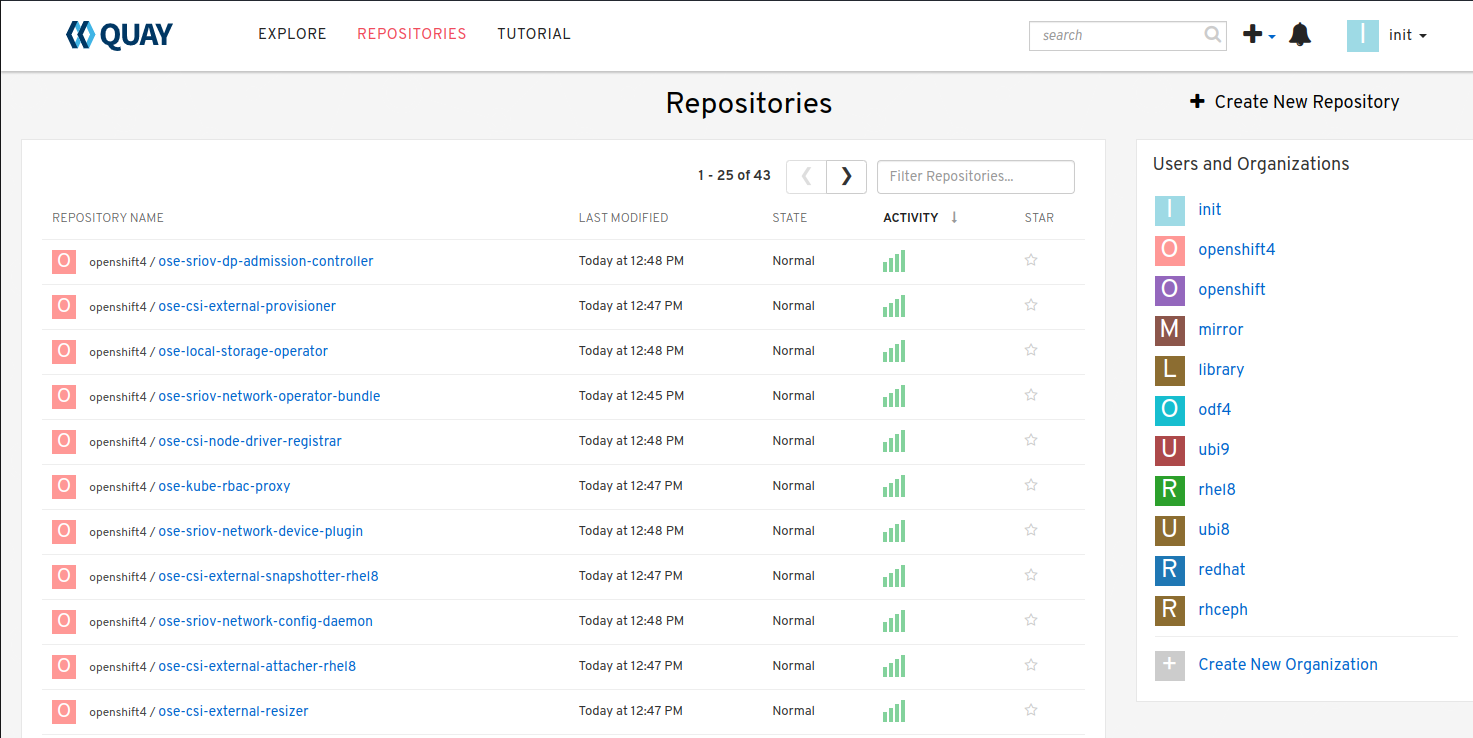
Update Cluster for Node Registry
Extract OCP pull-secret. A new local file
.dockerconfigjsonis created.oc extract secret/pull-secret -n openshift-config --confirm --to=. cat ./.dockerconfigjson | jq . > ./.dockerconfig.json
Update
.dockerconfig.jsonwith local registry credentials.{ "auths": { "host31.ocp2.lab.local:8443": { "auth": "aW5pdDpwYXNzd29yZA==" } } }
Import the new pull-secret.
oc set data secret/pull-secret -n openshift-config --from-file=.dockerconfigjson=.dockerconfig.json
Create configmap of quay-rootCA.
oc create configmap registry-config --from-file=$quayHostname..8443=/home/core/mirror/ocp4/quay-rootCA/rootCA.pem -n openshift-config
Add quay-rootCA to cluster.
oc patch image.config.openshift.io/cluster --patch '{"spec":{"additionalTrustedCA":{"name":"registry-config"}}}' --type=merge
Apply the YAML files from the results directory to the cluster.
Important
Only do this for first Node hosting registry/mirror. If adding additional Node redundancy, skip to “Adding Registry & Mirror Redundancy” section.
oc apply -f ./oc-mirror-workspace/results-xxxxxxxxxx/
The ability to install operators from the local mirror requires the default operator hub sources to be disabled.
oc patch OperatorHub cluster --type json -p '[{"op": "add", "path": "/spec/disableAllDefaultSources", "value": true}]'
Attention
Any update to the operator list requires the “CatalogSource” to be updated. Delete and recreate the object.
Adding Registry & Mirror Redundancy
For redundancy it’s possible to run through these steps for each node in the cluster. The “trick” is to not over write the previous “mirror” config but append to them.
Append updates to
./oc-mirror-workspace/results-xxxxxxxxxx/
imageContentSourcePolicy.yaml
before applying them. In the example below I added both mirrors before re-applying the policy.apiVersion: operator.openshift.io/v1alpha1 kind: ImageContentSourcePolicy metadata: labels: operators.openshift.org/catalog: "true" name: operator-0 spec: repositoryDigestMirrors: - mirrors: - host31.ocp2.lab.local:8443/rhel8 - host32.ocp2.lab.local:8443/rhel8 source: registry.redhat.io/rhel8 - mirrors: - host31.ocp2.lab.local:8443/redhat - host32.ocp2.lab.local:8443/redhat source: registry.redhat.io/redhat - mirrors: - host31.ocp2.lab.local:8443/container-native-virtualization - host32.ocp2.lab.local:8443/container-native-virtualization source: registry.redhat.io/container-native-virtualization - mirrors: - host31.ocp2.lab.local:8443/odf4 - host32.ocp2.lab.local:8443/odf4 source: registry.redhat.io/odf4 - mirrors: - host31.ocp2.lab.local:8443/rhceph - host32.ocp2.lab.local:8443/rhceph source: registry.redhat.io/rhceph - mirrors: - host31.ocp2.lab.local:8443/openshift4 - host32.ocp2.lab.local:8443/openshift4 source: registry.redhat.io/openshift4 --- apiVersion: operator.openshift.io/v1alpha1 kind: ImageContentSourcePolicy metadata: name: release-0 spec: repositoryDigestMirrors: - mirrors: - host31.ocp2.lab.local:8443/openshift/release - host32.ocp2.lab.local:8443/openshift/release source: quay.io/openshift-release-dev/ocp-v4.0-art-dev - mirrors: - host31.ocp2.lab.local:8443/openshift/release-images - host32.ocp2.lab.local:8443/openshift/release-images source: quay.io/openshift-release-dev/ocp-release
With
./oc-mirror-workspace/results-xxxxxxxxxx/catalogSource-redhat-
operator-index.yaml
a new object for each mirror will need to be created. Update the “name” by appending the node-name to the end of the string for each mirror before creating the object.apiVersion: operators.coreos.com/v1alpha1 kind: CatalogSource metadata: name: redhat-operator-index-host32 namespace: openshift-marketplace spec: image: host32.ocp2.lab.local:8443/redhat/redhat-operator-index:v4.12 sourceType: grpc
Just like before we’ll need to append the new registry to the pull-secret. Use previous instructions to “extract” and “set” the pull-secret.
{
  "auths": {
    "host31.ocp2.lab.local:8443": {
      "auth": "aW5pdDpwYXNzd29yZA=="
    },
    "host32.ocp2.lab.local:8443": {
      "auth": "aW5pdDpwYXNzd29yZA=="
    }
  }
}
Append the registry-config configmap with the new CA.
oc edit configmap registry-config -n openshift-config

data:
  host31.ocp2.lab.local..8443: |
    -----BEGIN CERTIFICATE-----
    MIIDxjCCAq6gAwIBAgIUYmcQxIY2...
    -----END CERTIFICATE-----
  host32.ocp2.lab.local..8443: |
    -----BEGIN CERTIFICATE-----
    MIIDxjCCAq6gAwIBAgIUVwvE92Vp...
    -----END CERTIFICATE-----